Wiring
Phone Jacks:
Phone wiring is normally done with
category 2 (CAT2)or category 3 (CAT3)cable. Category 5
cable (CAT5)can also be used but it is not required for
phone jack connections. CAT5 is only required for higher
speed connections such as computer networking or T1
connections where more data is passed through the
connection. When using CAT5 cable is is important to also
use CAT5 connection hardware such as CAT5
Phone Jacks and/or
Patch Panels.
For detailed information on installing
cables and telephone wiring visit our page on "
Installing
Phone Cable"
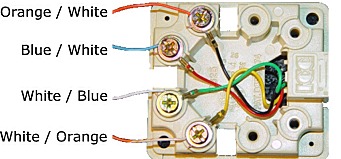
Here is an
example of how most 4 wire phone systems are connected to a
standard surface mount phone jack. It may be necessary on some
systems to "flip" the Orange/White & White/Orange pair to
make the phone work.
2 wire systems such as Avaya Magix,
Toshiba, IVX, Nortel and Vodavi
would only require the Blue/White -
White/Blue pair to be connected to
the 2 center pins or the Green Red
wires of the jack.
Wires should be striped back
approximately 1/2 an inch and wound
around the binding lug in a
clockwise direction being careful
not to cross over the wire already
wound in the lug.
RJ11: Provides connection for 1
pair of wires.
RJ14: Provides connection for 2
pair of wires.
RJ31X: Provides connection for line
bypass for applications such as
alarm systems.
RJ21X: Telephone Company Interface
for 25 pair cable.